AI writing tools are applications that use artificial intelligence, specifically large language models (LLMs), to generate, edit, and optimize text. The best tools go beyond simple text generation, offering features for SEO, content strategy, and direct publishing to streamline your entire content workflow, from idea to live article.
Whether you need a simple grammar check, a full article draft, or a completely automated content engine, there's a tool built for the job. This guide breaks down the different tiers of AI writers, reviews the top options in each category, and helps you choose the right solution to scale your content production.
The 3 Tiers of AI Writing Tools: Which Do You Need?
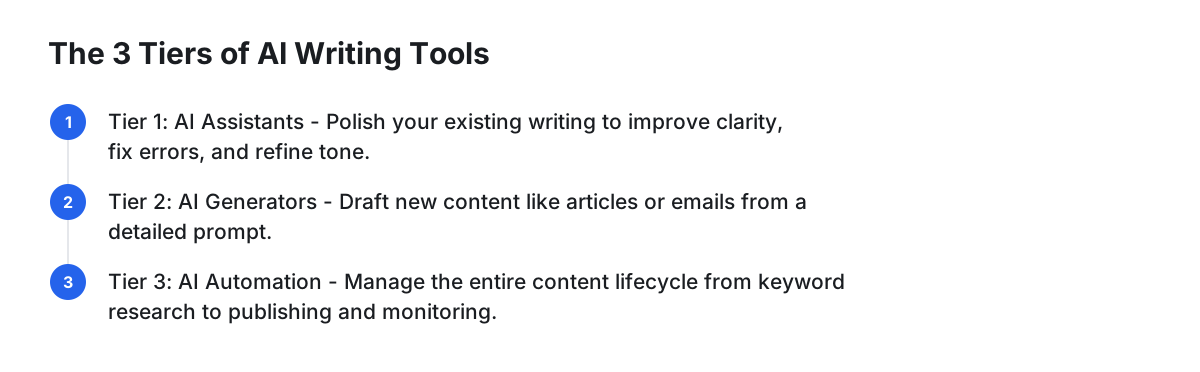
Not all AI writers are created equal. They fall into three main categories based on their level of assistance and automation. Understanding these tiers is the key to choosing a tool that solves your actual problem instead of just creating more editing work.
- Tier 1: AI Writing Assistants (The Polishers). These tools act as a co-pilot, improving your existing writing. They focus on fixing errors, enhancing clarity, and refining tone. They don't write for you, but they help you write better. They are perfect for writers who want to polish their final drafts.
- Tier 2: AI Content Generators (The Drafters). This is the most common category. You provide a detailed prompt, and the tool generates a draft of an article, email, or social media post. They are excellent for overcoming writer's block but still require significant manual effort for strategy, editing, and publishing.
- Tier 3: AI Content Automation Systems (The Engines). The most advanced tier. These platforms go beyond writing to manage the entire content lifecycle. They handle keyword research, content strategy, article creation, publishing, and even performance monitoring. They are designed to put your content marketing on autopilot.
Tier 1: AI Writing Assistants (The Polishers)
If your goal is to enhance your own writing rather than replace it, an AI assistant is the perfect choice. These tools integrate into your workflow to provide real-time feedback.
Grammarly
Grammarly is the industry standard for improving written text. Beyond a sophisticated grammar and spell checker, its AI-powered suggestions help fix grammatical errors, improve clarity, and adjust tone. Its real value lies in features like the tone detector, which analyzes your word choice and phrasing to tell you how your writing might sound to a reader (e.g., confident, formal, friendly). For teams, Grammarly Business offers style guides to ensure brand-wide consistency.
- Best For: Professionals, students, and content teams who want to ensure their writing is clear, correct, and professional.
- Key Feature: The real-time tone detector and customizable team style guides.
QuillBot
QuillBot is a powerful assistant best known for its paraphrasing capabilities. It offers multiple modes—like Standard, Fluency, Formal, and Creative—that allow you to control how your text is rewritten. This is invaluable for simplifying complex technical jargon for a general audience or rephrasing a paragraph to avoid self-plagiarism in academic writing. It also includes a summarizer and a co-writer tool that helps complete your sentences.
- Best For: Students, academics, and writers looking to rephrase content for clarity and originality.
- Key Feature: A best-in-class paraphrasing engine with distinct modes to control the output's style and intent.
Tier 2: AI Content Generators (The Drafters)
When you need to create content from scratch, these AI tools are your go-to. They take a prompt and turn it into a structured draft, saving hours of initial writing time.
Jasper (formerly Jarvis)
Jasper is a premium tool designed for marketing and business use cases. While its 50+ templates are a key feature, the real power is in specific ones like the AIDA (Attention, Interest, Desire, Action) and PAS (Problem-Agitate-Solution) frameworks which produce high-converting ad and landing page copy. Its "Brand Voice" feature goes beyond style, allowing you to upload documents or scan a URL so it can learn and replicate your specific tone and product knowledge. Its long-form editor provides more control than many competitors, making it a favorite for teams producing high volumes of on-brand content.
- Best For: Marketing teams and businesses that need to generate a wide variety of on-brand copy quickly.
- Key Feature: Advanced marketing framework templates (AIDA, PAS) and a superior Brand Voice function.
Writesonic
Writesonic is a strong Jasper alternative, often at a more accessible price point. Its standout feature is Chatsonic, a ChatGPT-like conversational AI that integrates real-time Google data into its responses, making it more suitable for writing about current events or topics requiring up-to-date information. It also includes Photosonic for AI image generation and a comprehensive library of templates similar to Jasper's, making it a powerful, all-in-one content creation suite.
- Best For: Bloggers, marketers, and businesses looking for a versatile, fact-aware AI writer without the premium price tag.
- Key Feature: Chatsonic, which combines a conversational AI with live Google search data for factual, current content.
Rytr
Rytr excels in simplicity and affordability, making it one of the best entry points into AI writing. Its interface is clean and uncluttered, focusing on a straightforward workflow: select a use case (like 'Blog Idea & Outline'), provide some input, and generate. While it may lack the advanced features of Jasper, its output is consistently high-quality for short-form content. The built-in plagiarism checker (powered by Copyscape) is a huge plus, offering peace of mind directly within the editor.
- Best For: Freelancers, solo entrepreneurs, and anyone needing a fast, affordable tool for short-form copy and blog outlines.
- Key Feature: A generous free plan and a simple, highly efficient user interface.
Sudowrite
Sudowrite is a niche tool built specifically for creative writing. It's not for marketers but for novelists, screenwriters, and hobbyists. Its features are unique in the market, including 'Describe,' which takes a simple concept (e.g., 'a spooky castle') and generates rich, sensory descriptions. Its 'Brainstorm' tool can generate plot points, character names, or world-building ideas. It acts as a creative partner to help writers break through blocks and explore new narrative possibilities.
- Best For: Fiction writers, screenwriters, and anyone engaged in creative storytelling.
- Key Feature: Specialized creative tools like 'Describe' and 'Brainstorm' that are tailored to narrative fiction.
Tier 3: AI SEO & Content Automation (The Engines)
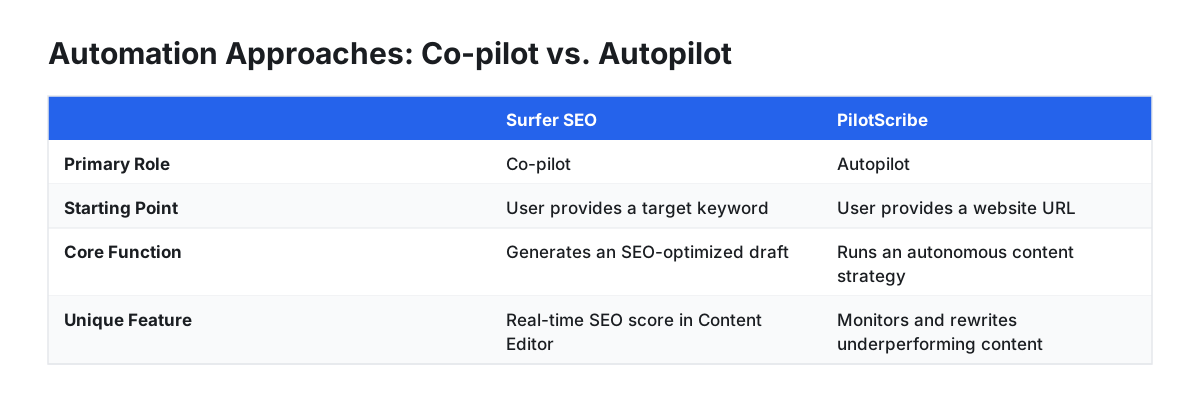
The biggest challenge with content generators is the manual work that remains. You still have to do the keyword research, write the perfect prompt, edit the output, format it, and publish. Tier 3 platforms solve this by automating the entire process.
Surfer SEO
Surfer is a dominant player in the SEO content space. Its core strength is the Content Editor, which provides a real-time SEO score on your writing based on SERP analysis. While it started as an assistant, Surfer has moved into automation by allowing you to generate a full, SEO-optimized article draft with one click based on your target keyword. However, it's best viewed as a powerful co-pilot; it hands you a well-researched draft, but the strategy, final edits, and publishing are still on you.
- Best For: SEOs and content marketers who want data-driven guidance and a powerful starting draft.
- Trade-off: Requires significant hands-on work to refine and publish content; it automates the draft, not the entire workflow.
SEOWriting.ai
This tool is built for scale, excelling at bulk article generation. You can upload a list of keywords and have it produce dozens of articles at once. Its one-click generation is highly customizable, with options for tone, point of view, and specific SEO parameters. It also integrates directly with WordPress for auto-publishing. It's an efficiency powerhouse for programmatic SEO or affiliate sites.
- Best For: Affiliate marketers and agencies needing to produce a high volume of content efficiently.
- Trade-off: The strategy and keyword research are entirely manual. It executes your plan at scale but doesn't create the plan for you.
PilotScribe
PilotScribe represents the furthest end of the automation spectrum. Unlike other tools where you input keywords, you start by simply providing your website URL. The platform then analyzes your business, performs its own keyword research using real search-volume data, and identifies high-opportunity topics. From there, it writes, schedules, and publishes SEO-optimized long-form articles directly to your CMS (WordPress, Shopify, etc.) on autopilot. Its key differentiator is a performance-based feedback loop: PilotScribe monitors the Google rankings of its articles and automatically rewrites weak titles or refreshes underperforming posts. This makes it a self-optimizing system, not just a writer. A 24-hour review window ensures editorial control before anything goes live.
- Best For: Solo founders, SMBs, and agencies who want the results of a full content marketing strategy without the day-to-day operational overhead.
- Trade-off: Less granular control over individual article topics compared to manual tools, as it's designed to run an entire strategy autonomously.
For businesses that want to stop managing a content calendar and start getting results, this set-and-forget model is the definitive solution. Put your blog on autopilot with PilotScribe.
Comparison Table: Choosing Your AI Writing Partner
| Tool | Tier | Starting Price | Best For | Key Differentiator |
|---|---|---|---|---|
| Grammarly | 1 (Assistant) | Free, Premium at $12/mo | Professionals & Teams | Real-time tone detector & style guides |
| Rytr | 2 (Generator) | Free, Saver plan at $9/mo | Budget-conscious users | Simplicity and a generous free tier |
| Writesonic | 2 (Generator) | Free trial, Business at $12.67/mo | Bloggers & Marketers | Chatsonic AI with live Google data |
| Jasper | 2 (Generator) | Creator plan at $39/mo | Marketing Teams | Advanced marketing frameworks & Brand Voice |
| Sudowrite | 2 (Generator) | Hobby & Student at $10/mo | Creative/Fiction Writers | Specialized narrative and descriptive tools |
| Surfer SEO | 3 (Automation) | Essential plan at $69/mo | SEO Content Specialists | Data-driven content briefs & one-click drafts |
| PilotScribe | 3 (Automation) | Solo plan at $49/mo | Hands-off SEO & Growth | Fully autonomous research, writing & optimization |
How to Choose the Right AI Writing Tool: 4 Key Criteria
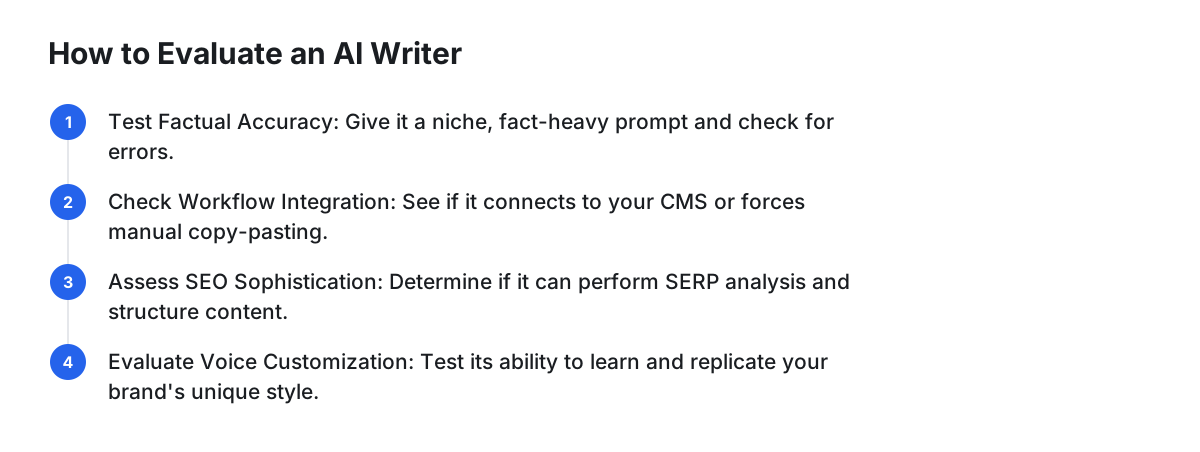
Instead of generic advice like "look for quality," use these specific tests to evaluate a tool.
- The Factual Accuracy Test. Give the tool a prompt on a niche, fact-heavy topic in your industry. For example: "Explain the key differences between the H.264 and H.265 video codecs, including average compression improvements." Does it provide accurate figures or does it hallucinate statistics? A good tool will deliver verifiable facts or state its limitations.
- Workflow Integration. Does the tool export to a .docx file, forcing you to copy-paste and reformat everything? Or does it integrate directly with your CMS (WordPress, Webflow, Shopify) to publish drafts automatically? The difference is hours of administrative work per week.
- SEO Sophistication. Ask yourself if it's just a writer or a true SEO tool. A basic tool lets you input keywords. A sophisticated tool (like Surfer or PilotScribe) performs its own SERP analysis, suggests related keywords, structures the article with optimal H2s/H3s, and may even add internal links.
- Voice & Tone Customization. Can the tool truly learn your brand voice? Test its customization features. Give it a URL to a blog post you've written and ask it to write a new paragraph in that style. Compare the output side-by-side with your original. The closer it gets, the less time you'll spend editing.
FAQ
What is the best AI tool for writing?
For full content automation, PilotScribe is the best choice because its system actively monitors Google rankings and self-optimizes underperforming content—a feature other tools lack. For hands-on marketing copy, Jasper excels due to its 'Brand Voice' feature that deeply learns your style for consistency across many content formats. For polishing your own writing, Grammarly is unmatched for its real-time tone and clarity feedback.
Is it illegal to publish a book written by AI?
No, it is not illegal to publish a book written by AI, but copyright law and platform policies are still developing. You must comply with the rules of the platform you're using (for example, Amazon KDP requires you to disclose the use of AI) and understand that purely AI-generated text may not be eligible for copyright protection in some jurisdictions.
Is there a free AI writer?
Yes, many excellent free AI writers are available. ChatGPT, Claude, and Google Gemini offer very capable free tiers for a wide range of tasks. For specific use cases, Rytr has a generous free plan for copywriting, and Grammarly provides a robust free version for grammar and style checking.
What are the top 5 most popular AI tools?
The top 5 most popular AI tools generally include ChatGPT, Grammarly, Jasper, Surfer SEO, and Writesonic. This list reflects the market's needs for general-purpose conversational AI, writing assistance, specialized marketing copy generation, and data-driven SEO content creation.