
The short answer: don't hunt for "low CTR" pages. Hunt for queries whose CTR is low compared to other queries of yours ranking at the same average position, then rank those by how many clicks you could realistically recover. Everything up to that flagging step can be automated with the Search Console API and a scheduled script. The rewrite itself — and the decision of whether a rewrite is even the right fix — still needs judgement, human or AI, with a review step before anything ships.
Disclosure: this article is published by PilotScribe, which sells an SEO content service. The method below is written to work with a spreadsheet and the Search Console API alone; the tooling section at the end is clearly separated and labelled as a company claim.
Here is the loop in full.
The six-step loop
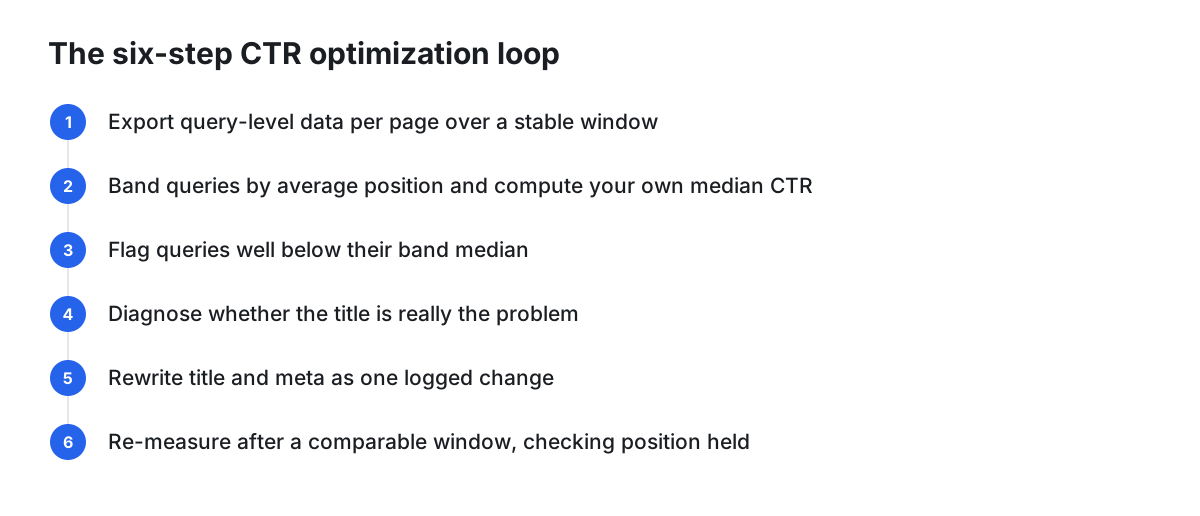
- Export query-level data per page for a window long enough to be stable (not last week's noise).
- Band every query by average position — 1–3, 4–6, 7–10, 11–20 — and compute your site's own median CTR inside each band.
- Flag outliers: queries sitting well below their band median.
- Diagnose before touching anything: is the title weak, or is something else eating the click?
- Rewrite the title (and the on-page heading, where it matches) as a single, logged change.
- Re-measure after a comparable data window, checking what happened to average position before you claim a CTR win.
The rest of this article is how to do each step without fooling yourself.
Pull the right data, not the convenient data
A page-level CTR number is a reasonable screening signal and a poor decision signal: it averages across every query the page ranks for, so a low figure is worth flagging for further evaluation rather than acting on directly.
So: screen at page level, decide at query level. Lazuk's documented process is to filter the Search Console performance report to the exact URL, then analyse that page's query report by clicks, impressions, CTR and average position — typically over a comparative timeframe such as the last 28 days versus the previous 28 days, with 28-day or three-month exports depending on how much traffic the site gets (Ethan Lazuk).
Two things to build into your process before you set numeric thresholds. First, check Google's current Search Console documentation for how far back performance data goes and how very low-volume queries are treated, so you know whether your export is a sample or something close to a census. Second, remember that "average position" flattens volatility: a query that bounced between position 3 and position 15 averages out to a number that describes no day in particular. And if your business is seasonal, a short date range plus a seasonal peak equals a false diagnosis.
Build your own baseline instead of borrowing a benchmark table
Published "CTR by position" tables are tempting because they give you an instant expected value. The problem is that they come from someone else's device mix, brand strength, query mix and result layout, and from whenever the data was collected. You have no way to check whether any of that matches your site — which makes any gap you compute against them unverifiable.
Your own data is the fair comparison, and it costs one extra column. Group every query for the pages you care about into position bands and take the median CTR per band. Use the median rather than the mean: a handful of branded queries with very high CTR will drag an average upward and hide genuine underperformance everywhere else. That per-band median becomes the expected value a query should roughly hit. Anything meaningfully below it is a candidate — not a conclusion.
Recompute the medians every time you re-run the export. If search-result layouts in your niche change, your own medians move with them; a static benchmark table does not.
Prioritise by recoverable clicks, not by lowest CTR
The lowest-CTR query on your site is probably an irrelevant long-tail impression at position 47. Ignore it. Score candidates like this:
Recoverable clicks = impressions × (band median CTR − actual CTR)
Sort descending. That list — and only that list — is your work queue. It pushes you toward pages that already rank reasonably well and already have impressions, which is also where Lazuk's audit process ends up: he prioritises pages by type, by importance to the business, and then by clicks before looking for title opportunities (Ethan Lazuk).
Note that the largest percentage-point gap is not necessarily the largest opportunity: a wide gap on a query with few impressions can be worth far fewer clicks than a narrower gap on a query with many impressions. Sorting by gap alone would put you on the wrong job.
Diagnose before you rewrite
A flagged query is a question, not an instruction. Common reasons a new title won't help:
- The content doesn't match the intent. Answering "no" to the diagnostic questions (are the high-impression queries relevant? does the page rank well for them? is CTR high given that position?) "doesn't necessarily mean that updating the page's title tag would solve these issues," Lazuk notes — it may be that the page's content isn't a good match for the search intent (Ethan Lazuk). Hypothetically: if you rank for a broad "best X" comparison query with a single product page, no title will fix that.
- The result layout is absorbing the click. The same source lists the alternative explanation that "the SERP layout itself has other features and types of results that earn clicks" (Ethan Lazuk). Check the live result page on desktop and mobile; title links can differ across device types and from query to query.
- Google isn't showing your title anyway. Google states that generation of title links "is completely automated" and lists the sources it draws on: content in
<title>elements, the main visual title on the page, heading elements such as<h1>, content inog:titlemeta tags, other large and prominent text, other page text, anchor text, text within links pointing to the page, andWebSitestructured data (Google Search Central). If Google rewrites your title, Lazuk's reading is that "this isn't necessarily a problem. It just means the title tag you provided wasn't the best match for the user's search intent" (Ethan Lazuk). - The query isn't really yours. Navigational or competitor-branded queries where you appear incidentally don't belong in the same band comparison as your own topical queries.
A rewrite rubric that isn't "make it catchier"
Google's own best practices for influencing title links give you most of the rubric (Google Search Central):
- Give every page a
<title>, and write text that is descriptive, concise and distinct from your other pages. Vague titles like "Home" and repeated boilerplate across a page set both make results harder for users to tell apart. - Front-load what matters. There's no limit on how long a
<title>can be, but the title link "is truncated in Google Search results as needed, typically to fit the device width" — so the decisive words need to come early. - Don't keyword-stuff. Repeating the same words or phrases "can make your results look spammy to Google and to users."
- Brand concisely, typically as a short suffix or prefix separated by a hyphen, colon or pipe, rather than a full brand sentence on every page.
- Make it clear which text is the main title, since Google also looks at the main visual title and heading elements; competing headings of equal prominence create ambiguity.
- Kill obsolete labels. Google explicitly calls out year labels left behind in
<title>elements as a common issue that triggers a rewritten title link.
Two additions from the documented audit practice: match the grammatical form of the intent, and drop brand wording your audience doesn't recognise. In the case Lazuk describes, a statement-style title — "The Cost of Repairing XYZ in Florida | Brand" — became a question, "What is the Cost to Repair Your XYZ in Florida?", the same change was applied to the H1, and a brand rendering "didn't match what most consumers recognized as the brand's name, so we removed it" (Ethan Lazuk).
The snippet matters too, not just the headline. Google's SEO starter guide frames the title link and the snippet as the visual elements of a result you can influence to help users decide whether to visit your site (Google Search Central). Treat the meta description as the pitch that follows the headline, and write it for the same query.
What the documented outcomes actually show
In the second of Lazuk's two mini case studies, a category page already ranking in the top five for most of its relevant queries was getting around 8 clicks per day at a CTR "around 2% or less on average"; after adding a single word to the title tag and H1 "to better fit the context of the audience's search intent," average clicks went to 21 per day with an average CTR closer to 8% for the main queries (Ethan Lazuk).
The author's own disclaimer is the important part: these results "aren't meant to imply this level of optimization will result in similar results for all pages all of the time." Treat it as evidence that wording can matter, not as a forecast for your pages.
Change one variable, and write it down
If you change the title, the intro, the internal links and the publish date on the same day, you've destroyed attribution. Keep a change log with: URL, old title, new title, date changed, date Google recrawled, and the queries you expect to move. Lazuk makes the same point about recording the original title and the date of any change (Ethan Lazuk).
The recrawl date is part of the measurement, not an afterthought. Google notes that it "has to recrawl and reprocess the page to notice updates to these sources, which may take a few days to a few weeks," and that you can request a recrawl (Google Search Central). Lazuk's practical expectation is that a new title "will likely show within a few days, or sooner if you request a crawl manually in GSC" (Ethan Lazuk). Verify by searching the query yourself rather than assuming.
Measuring honestly
Give it time. Google's guidance on changes generally is that some take effect in hours and others take months, and that you "likely want to wait a few weeks to assess whether your work had beneficial effects" — while also warning that not every change produces a noticeable effect in search results (Google Search Central).
Then check three things before declaring a CTR win:
- Did average position move? This is the trap. In Lazuk's blog-article case, the top queries went from an average position of 5.2–7.5 with CTR of 3.1%–7.5% in the first month after the change, to positions of 1.2–1.4 with CTR of 22.9%–26.5% in the second month (Ethan Lazuk). Most of that CTR jump travels with the ranking jump. If you want to claim a title effect specifically, you need position to be roughly flat.
- Did untouched pages behave the same way? Keep a control group of comparable pages you didn't edit. If everything moved, you measured a seasonal or algorithmic shift.
- Did you read it too early? The same case shows the first month telling a partial story and the second month a much larger one, which the author summarises as the update being felt immediately but taking about a month for the full benefit to be realised (Ethan Lazuk). A two-week readout would have understated it.
What "automated" realistically means
Automate the boring, deterministic parts. These are pure data operations with no judgement in them:
- scheduled Search Console API exports into a sheet or a BigQuery table;
- position banding and median calculation;
- the recoverable-clicks score and outlier flagging;
- alerts when a page's CTR falls below its band median by more than X points;
- post-change monitoring against the control group;
- the change log itself, written automatically at publish time.
Language models can do useful work on the next step — drafting several candidate titles per flagged query, checking them against the rubric above, spotting obsolete year labels and duplicated boilerplate across a page set, and summarising which queries a page actually ranks for. Don't rely on a model alone for the diagnosis step — deciding whether this page needs a new title, new content, or nothing at all. Keep a human in that loop, reviewing the live result page with knowledge of the business.
So don't wire generation straight to publication. The failure modes are predictable: brand voice drift, keyword stuffing of the exact kind Google calls spammy, titles that no longer match page content (which Google may simply override anyway), and — the worst one — an automated job overwriting a title a human tuned last month. Any rewrite pipeline needs approval, version history and one-click rollback.
For most sites, ordinary software is enough: Search Console's own performance report plus a spreadsheet will carry you through the whole loop. A scripted version is worth building when you're checking dozens of pages on a recurring schedule, or when you want alerting rather than a manual audit. A paid service is a conditional option on top of that — reasonable if you don't want to maintain the pipeline, unnecessary if you'll run the audit quarterly by hand.
A practical DIY stack: Search Console API → scheduled script → banded CTR table → flagged queue → draft titles reviewed by a human → CMS update → change log row.
If you'd rather not maintain the pipeline
Some content platforms fold the monitoring loop in. As the publisher of this article, we'll describe ours and then give you the questions to interrogate it — and any competitor — with.
PilotScribe states that when you connect Search Console it "checks how every article actually ranks — every single day — then rewrites weak titles, refreshes fading posts, and pushes page-2 articles up," and that optimised articles ship to your blog automatically, "each with a review window" before going live (PilotScribe). Its privacy policy describes the data this relies on: with your consent via the Google OAuth connection, it accesses your site's search queries, clicks, impressions and average positions (PilotScribe privacy policy).
Those are company claims about product behaviour, not independently verified outcomes, and no tool in this category can promise a ranking or traffic result. Evaluate ours the way you'd evaluate any other.
A practical test for any automated CTR tool
Run this before you give anything write access to your CMS:
- Pick three pages you already understand — one you believe has a genuine title problem, one where the content is the problem, and one that's fine.
- Ask the tool what it would do to each, without letting it publish. A tool that proposes a rewrite for all three isn't diagnosing, it's generating.
- Check the comparison basis. Does it compare CTR within position bands using your own data, or against a generic benchmark table? Ask explicitly.
- Inspect one proposed title against Google's rubric: distinct, concise, decisive words first, no stuffing, no stale year label, brand kept short.
- Verify the audit trail. Every change should be logged with before/after and a timestamp, and you should be able to roll back a single change without touching the others.
- Confirm the human gate. Is there a review window, who gets notified, and what happens if nobody approves?
- Check the write scope it requests from your CMS, and the data scope it requests from Google.
- Ask how it attributes results. If it reports a CTR gain without reporting what happened to average position over the same window, the number doesn't mean much.
If you're running the loop yourself, the same eight checks work as a review checklist for your own script.
FAQ
What is CTR in Google Search Console? Click-through rate is the share of impressions that resulted in a click, reported in Search Console alongside clicks, impressions and average position. You can read it per page, per query, per country and per device — and the per-query view is the one that supports a decision, because a page-level figure averages across every query the page ranks for.
Will Google actually display my new title?
Not necessarily. Google generates title links automatically from several sources, including your <title>, the main visual title, heading elements, og:title, prominent page text, anchor text and WebSite structured data (Google Search Central). Search the query manually on desktop and mobile after the recrawl to see what's actually rendered.
How long should I wait before judging a rewrite? Allow for the recrawl first — days to weeks, per Google (Google Search Central) — then a measurement window at least as long as your baseline, and longer if the page is seasonal. Google's general guidance is to wait a few weeks before assessing a change (Google Search Central), and in one documented case the full effect appeared only in the second month (Ethan Lazuk).
Can I let AI rewrite titles unsupervised? Treat generation as drafting, not deciding. The diagnosis step — whether the title is the problem at all — depends on inspecting the live result page and knowing your business, and a wrong call there produces a title that misrepresents the page. Keep approval, history and rollback in the loop.
Do I need a tool for this? No. The entire loop runs on the Search Console performance report and a spreadsheet. Automate it when the manual version becomes a recurring chore, not before.