
Refreshing older content is one of the most effective search engine optimization tactics, but manually auditing historical URLs through spreadsheets can be tedious and difficult to sustain. Arbitrarily picking older posts based solely on calendar age often wastes time on articles with little search demand or potential.
To update content systematically, you can build an automated detection workflow powered by real performance metrics from Google Search Console (GSC). A safe and sustainable pipeline automates performance tracking, highlights decaying URLs, prepares structured update requirements, and preserves editorial review before changes go live.
What "Underperforming" Means in Search Console Data
To automate decay detection, you must translate the concept of an underperforming post into concrete metrics. Depending on your site's goals, underperformance generally manifests in four patterns:
- Click Decay Over Time: A URL that previously generated consistent organic traffic begins losing clicks across rolling date comparisons (such as the last 28 days compared to the preceding 28 days).
- Striking-Distance Rankings (Hypothetical Rule): A URL ranks consistently on page two (for instance, an average position between 8 and 20) while accumulating impressions. The page already demonstrates topical relevance in search results but may lack the comprehensive coverage needed to reach the top tier.
- Below-Average Click-Through Rate (Hypothetical Rule): A URL maintains a prominent ranking position (such as top five) but earns a CTR noticeably lower than typical expectations for that spot, indicating that the title tag or meta description may fail to align with search intent.
- Query Expansion Gaps: A URL accumulates impressions for related secondary queries or long-tail terms that are not explicitly covered in the existing article text.
Practical Advice: When setting automated thresholds, establish an impression floor (such as requiring at least several hundred monthly impressions) so zero-traffic or irrelevant pages do not generate false alarms in your queue.
3 Ways to Access and Automate Search Console Data
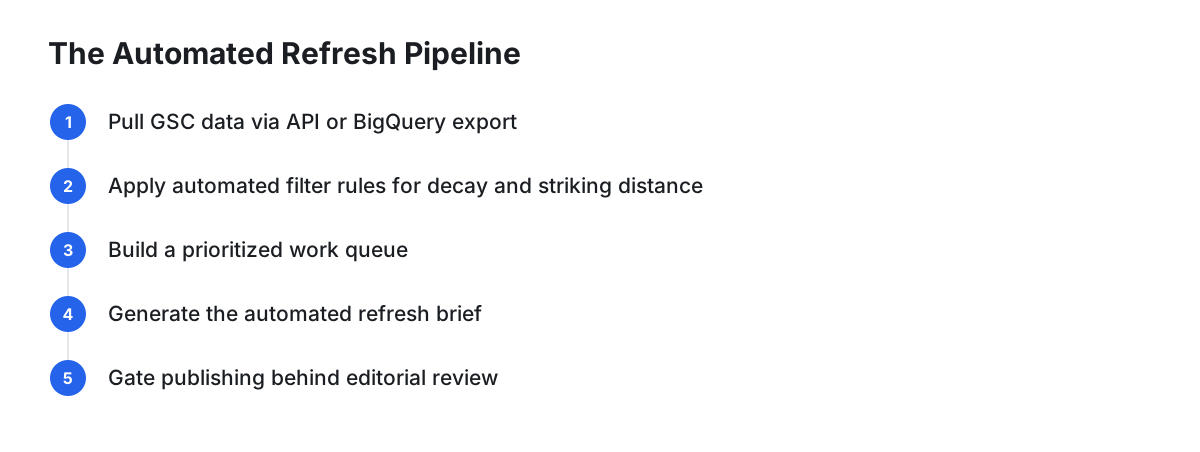
According to Google's official documentation, site owners can access Search Console performance data through three primary mechanisms depending on site size and technical requirements:
1. The Search Console User Interface (Standard / Manual Monitoring)
For smaller content libraries, built-in features in the Search Console performance report are often sufficient. You can select date comparisons (such as "Compare last 28 days to previous period"), filter by page, and sort by click differences to identify declining URLs. Saving and checking bookmarked report configurations allows manual monitoring without writing code.
2. Looker Studio Connector (Scheduled Automated Reporting)
Google provides a direct Search Console connector for Looker Studio. You can build an automated dashboard that calculates period-over-period click changes at the URL level, filters out low-impression pages, and uses Looker Studio's scheduled delivery feature to email periodic report summaries to your content team.
3. Search Analytics API or BigQuery Bulk Data Export (Programmatic Automation)
For sites with large content catalogs or high query volumes, Google provides direct programmatic data pipelines. As documented on the Google Search Central Blog, Search Console supports bulk data exports that dump daily performance data into Google BigQuery. This export includes the searchdata_url_impression table, which provides detailed URL- and query-level impressions and clicks.
A custom script can query the BigQuery dataset or the Search Analytics API on a schedule, identify URLs meeting specified decay criteria, and push prioritized alerts into your content management or issue-tracking workflow.
+--------------------------------------------------------+
|              Google Search Console Data                |
|       (Search Analytics API / BigQuery Export)         |
+--------------------------------------------------------+
                           │
                           ▼
+--------------------------------------------------------+
|                 Automated Filter Rules                 |
|  - Click drops over time    - Striking-distance ranks  |
|  - CTR underperformance    - Impression thresholds    |
+--------------------------------------------------------+
                           │
                           ▼
+--------------------------------------------------------+
|                 Prioritized Work Queue                 |
|       URLs grouped by decay severity and volume        |
+--------------------------------------------------------+
                           │
                           ▼
+--------------------------------------------------------+
|              Automated Refresh Brief Built             |
|   - Queries gaining search impressions                 |
|   - Sections associated with stable rankings           |
+--------------------------------------------------------+
                           │
                           ▼
+--------------------------------------------------------+
|              Gated Human/Editorial Review              |
|         (Approve, revise, and publish updates)         |
+--------------------------------------------------------+
Prioritizing Opportunities: A Hypothetical Triage Model
Not every declining post requires an identical response. The following hypothetical triage matrix illustrates how you might categorize flagged URLs to match the appropriate editorial action:
| Content Status | Performance Signals (Hypothetical) | Primary Action Needed | Relative Effort |
|---|---|---|---|
| CTR Decay | Stable high position, declining clicks, low CTR | Test and revise title tag and meta description | Low |
| Striking Distance | High impressions, positions on page two | Expand missing subtopics and answer emerging queries | Medium |
| Fading Leader | Steady, sustained loss in clicks and primary positions | Full content review against current SERPs; update outdated data | High |
| Zero Demand | Minimal impressions, negligible relevance | Evaluate for consolidation or pruning | Low |
Note: Actual review and writing effort varies depending on topic complexity and editorial standards.
What the Automation Should Hand the Writer: The Refresh Brief
When automating update notifications, avoid generic prompts that advise rewriting an article from scratch. An unattended total rewrite risks removing the specific sections, entities, and keywords for which the page already ranks.
A structured refresh brief should highlight:
- Sections to Preserve: Identify headings and paragraphs that address queries where the URL already ranks well.
- Losing Queries: Highlight queries where visibility has slipped.
- Emerging Queries: Surface secondary keywords that generate growing impressions in Search Console but lack direct coverage in the text.
- Factual Verification: Flag sections containing date-sensitive references or outdated links that require review.
Guardrails and Human Review
While data collection and brief generation can be fully automated, critical publishing decisions should remain supervised:
- Avoid Unattended Rewrites: Automated text generation should not overwrite existing URLs without human verification of accuracy and tone.
- Preserve URL Slugs: Avoid changing URLs or permalinks during standard refreshes, as alterations risk breaking internal link structures and redirect chains.
- Avoid Superficial Date Changes: Modifying a publication date without making substantive, informative improvements provides no value to searchers.
- Account for Algorithm Changes: A sudden sitewide shift in traffic may reflect broader search algorithm updates rather than individual page decay. In such scenarios, review the overall search landscape before modifying individual posts.
Refresh Verification Protocol (Hypothetical Framework)
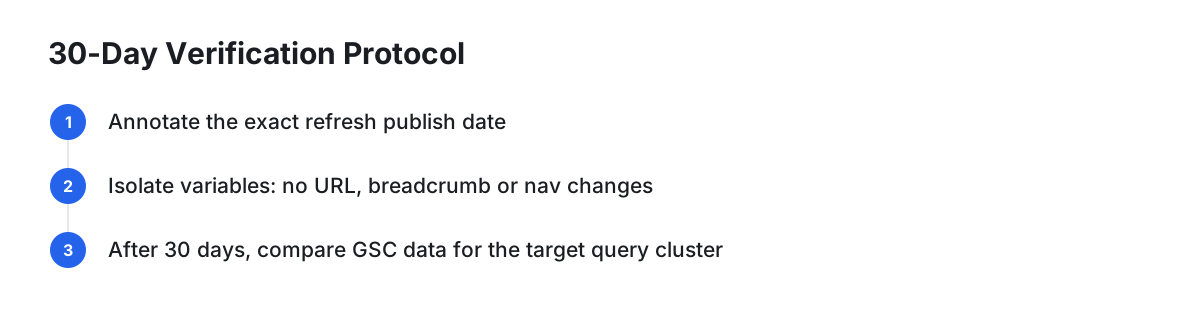
To evaluate whether content updates achieve their intended result, establish an isolated testing process:
- Log the Update: Record the exact date and details of the edits applied.
- Isolate Changes: Keep the URL slug, main site architecture, and breadcrumbs unchanged during the evaluation period.
- Evaluate Specific Query Clusters: Rather than relying only on aggregate sitewide traffic, evaluate Search Console metrics for the specific search queries targeted in the refresh brief.
Dedicated Automation: PilotScribe
(Disclosure: PilotScribe is our product.)
If you manage an active blog and prefer not to build custom BigQuery pipelines or maintain manual spreadsheets, dedicated software offers an integrated alternative. PilotScribe provides an SEO automation platform that connects directly to Google Search Console via OAuth.
According to the company, PilotScribe reviews article ranking data daily, identifies weak titles or fading posts, boosts page-2 posts with internal links, and produces content updates on a regular cadence. According to the company, PilotScribe provides a review window before publishing to connected CMS platforms (such as WordPress, Shopify, Webflow, Ghost, or custom headless sites).
Frequently Asked Questions
How soon does Google reflect updates in search results?
Crawling and index updates depend on your website's crawl frequency, site structure, and internal linking. Search engine bots typically discover changes during regular crawling cycles, though search ranking adjustments can take time to reflect editorial revisions.
When should I update the published date on a post?
Only adjust the visible date or display a "Last Updated" timestamp when you have made substantive improvements—such as adding new information, updating outdated figures, or clarifying key explanations. Purely cosmetic edits do not warrant an updated timestamp.
When is content consolidation better than refreshing?
If multiple short or overlapping articles on your site compete for the same search intent, or if an article targets an obsolete topic with no active search impressions, consolidating the material into a single comprehensive guide and setting up appropriate 301 redirects is often more effective than refreshing each post individually.