
Short answer: internal links are worth testing on a page-2 article, but treat the gain as a hypothesis you measure rather than a rule you can count on. Links redistribute attention inside your own site; my working assumption is that they won't repair a mismatch between your page and what searchers actually want. So the practical move is not "add internal links everywhere." It's a tight, measurable loop: find the queries where you sit at positions 11–30 with real impressions, pick donor pages that already rank for those words, place a few contextual links with descriptive anchors, write down the date, and check the position delta four weeks later against pages you didn't touch.
One caveat up front, stated plainly: the sources behind this article contain no controlled study quantifying how much adding internal links moves a page from position 14 to position 8 — or whether it moves it at all. Everything below that isn't explicitly attributed is a working editorial convention, not a documented finding. That's exactly why Step 5 (measurement against a control group) is the part you shouldn't skip: on your site, it's the only evidence that counts.
Disclosure: this blog is published by PilotScribe, which sells an automated SEO publishing service. The workflow below works with ordinary tools; the one section describing our own product is labelled as a vendor claim.
Step 1: Pull your real page-2 opportunities from Search Console
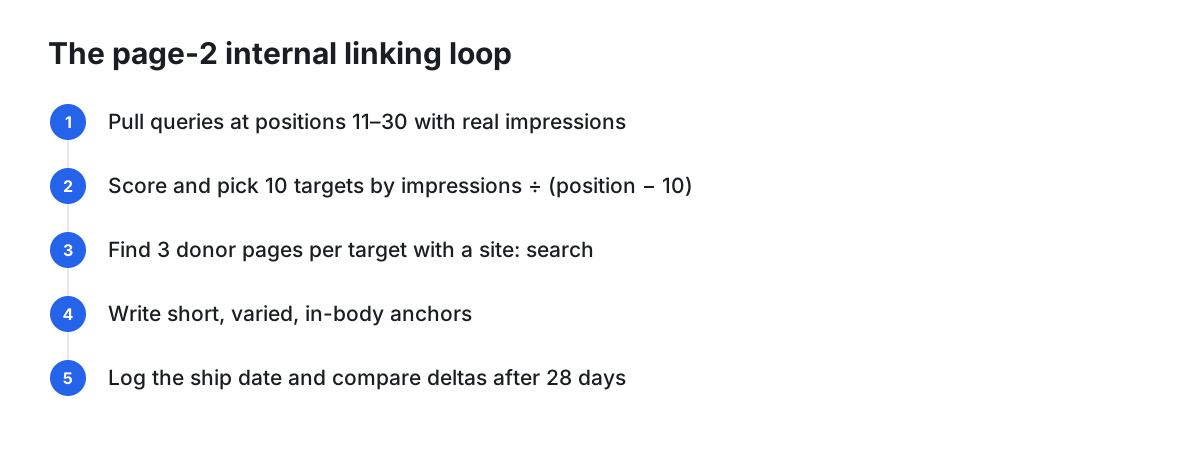
Start at the query level, not the page level. In the Search Console performance report, set a date range of roughly the last three months, display impressions and average position, and sort your queries so the high-impression ones sitting around positions 11–30 come to the top.
For each high-impression query, open the Pages view with that query filter applied. You now know two things most people skip: which exact query is nearly ranking, and which URL Google has chosen to rank for it. That URL is your target page. Linking to a different, "more relevant-feeling" page is, in my experience, a frequent wasted effort in this workflow.
A plain spreadsheet export is enough here. You don't need a dedicated platform to do Step 1.
Step 2: Prioritize by impressions and distance, not by how interesting the topic is
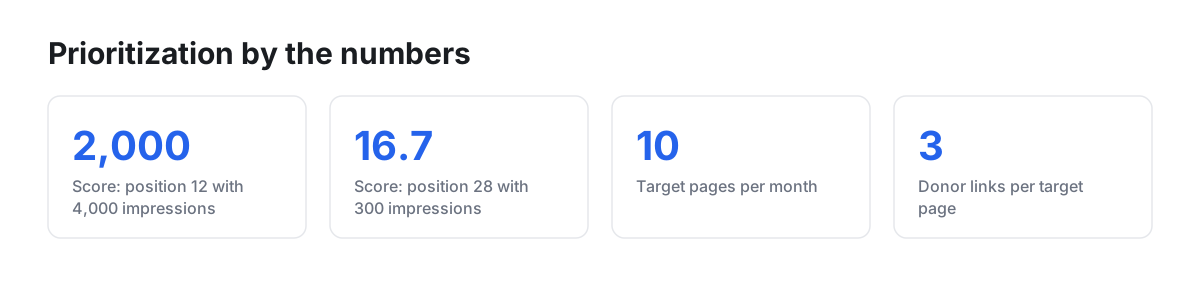
A query at average position 12 with 4,000 monthly impressions is a more promising target than one at position 28 with 300 impressions, even if the second topic is closer to your product. Something at position 11–15 is one visible step from the first screen; I treat deeper positions as more likely to be a content or intent problem that links are unlikely to solve — a working assumption, not a documented finding.
A simple scoring rule I use — a convention, not a validated formula: priority = monthly impressions ÷ (average position − 10). Position 12 with 4,000 impressions scores 2,000. Position 28 with 300 impressions scores 16.7. Take the top ten. Ten targets is enough work for one month and enough volume to see a pattern when you measure.
Step 3: Find donor pages with a site: search, not with vibes
Picking donor pages purely by felt "topical similarity" is guesswork. Instead, run site:yourdomain.com "your target query" in Google. The pages that come back are pages Google already surfaces for those words on your own domain. Those are your donor candidates — they're contextually relevant by definition, and a link from them reads naturally to a human.
Two sensible additional filters: pages that already receive clicks (they have attention to pass along) and hub or category pages that many readers pass through. Both are editorial judgment calls rather than documented rules.
Aim for three donor links per target page. More than that in a single month makes attribution harder and risks looking formulaic.
Step 4: Write the anchor, don't paste the keyword
My working convention — again, a convention, not a sourced requirement — is anchors that describe the destination in natural prose, run a few words long, and vary from link to link. Three links to the same page reading "internal link optimization," "internal link optimization," "internal link optimization" is a pattern; "how internal links pass authority," "our internal linking workflow," and "prioritizing page-2 URLs" is a sentence.
Place links in the body copy where a reader would plausibly click. The test is simple and human: would someone reading this paragraph want the thing on the other side of that link? If not, don't ship it.
Step 5: Log the change and measure against a control
This is the step that separates a method from a ritual, and the only part of this article that produces evidence.
Keep one sheet with: target URL, target query, baseline average position, baseline impressions, the three donor URLs, each anchor used, and the date you shipped the links.
Then pick five comparable page-2 pages you deliberately do not link to. They're your control group. After 28 days, compare the average position delta for the linked set against the control. If both moved by a similar amount, you measured a seasonal or algorithmic shift, not your links.
Hypothetical illustration — invented numbers, not measured data: suppose you link three donors to a post sitting at position 13.4. Twenty-eight days later it reads 9.1, while your five untouched controls averaged a 0.3-point improvement. A gap like that is worth repeating next month. If instead the controls also improved by four points, your links weren't the cause. Your own site may produce no gap at all — that is a legitimate result, and it saves you from repeating work that does nothing.
What automation actually handles well — and what it doesn't
The table below is my judgment about where software helps in this specific loop, not a vendor benchmark:
| Task | Automation fit | Why |
|---|---|---|
| Filtering page-2 queries out of Search Console data | Strong | Pure data filtering and sorting |
| Finding orphan pages and deep pages in a crawl | Strong | Mechanical graph analysis |
| Bulk link suggestions across hundreds of posts | Good | Scale beats manual scanning |
| Choosing the right target URL per query | Mixed | Needs intent judgment when two pages overlap |
| Anchor text phrasing and variation | Weak | Reads as templated when generated at volume |
| Deciding which of two overlapping pages should win | Weak | An editorial call with business consequences |
| Knowing when links won't help at all | Weak | That's a content and intent judgment |
The honest line: automation is good at discovery and weak at judgment. Let it surface candidates; keep a human on anchors and on any decision to merge, consolidate or retire a page.
Choosing tooling: five questions instead of a product list
I'm not going to rank internal-linking tools here, because I don't have primary product documentation for them and a list assembled from secondhand roundups would be guesswork. Evaluate any candidate — plugin, crawler or platform — against five questions you can answer yourself in a trial:
- Does it read your Search Console data, or only crawl your site? A crawl-only tool can't know which pages sit on page 2.
- Does it suggest links or auto-insert them? Both are legitimate; you need to know which before you turn it on.
- Can you edit the anchor before anything ships?
- Is there bulk rollback if a batch goes wrong?
- Does it work with your CMS, including headless setups?
When ordinary software is enough. If your site is small enough to review by hand, ordinary software may be all you need. A Search Console export, a spreadsheet, the site: operator and your CMS editor cover every step above. If you publish on WordPress with roughly a hundred posts or fewer, a suggestion-based plugin plus thirty minutes of manual review will usually serve you better than full automation: at that scale you can hold the site in your head, and the judgment steps matter more than throughput. Automation becomes worth paying for when the number of pages exceeds what you can review, or when the monthly loop reliably doesn't get done.
When internal linking won't fix it
Stop and fix the underlying problem instead if: the page is thin relative to what ranks; the results page is dominated by a format you don't match (video, comparison tables, forum threads); two of your own pages keep trading places for the same query; or the query's intent is transactional and your page is a definition post. Links can amplify a page that is nearly good enough; my working assumption — not a documented finding — is that they won't substitute for relevance the page doesn't have.
If you'd rather not run the loop by hand
This is the vendor section, and PilotScribe publishes this blog — read it as a company claim, not an independent assessment.
PilotScribe states that once Search Console is connected it checks how every article ranks daily, then "rewrites weak titles, refreshes fading posts, and pushes page-2 articles up," and describes page-2 posts being "boosted with internal links — automatically" (PilotScribe). The same page says optimized articles ship automatically, each with a review window before going live, and the service's terms state that AI-generated content may contain inaccuracies and that the customer remains responsible for reviewing, validating and publishing it (PilotScribe Terms of Service). That review window is documented for articles; the sources do not describe any review step for the automated internal-link changes themselves.
Those marketing descriptions come with no measurements, so no ranking improvement is evidenced by them. If you try an automated approach — ours or anyone's — keep the change log and the control group from Step 5, so the movement you see is checked against your own position data rather than a vendor description.
Your 30-day checklist
- Export Search Console queries, filter to positions 11–30, sort by impressions
- Score and select 10 target pages using impressions ÷ (position − 10)
- For each, run a
site:search for the target query to find 3 donor pages - Write 3 distinct, descriptive, in-body anchors per target
- Ship all links in a single week and record the date
- Tag 5 untouched page-2 pages as controls
- Set one calendar reminder for day 28 to compare deltas
- Keep what moved; investigate content and intent for anything that didn't
FAQ
How many internal links should point to a page-2 article? There's no documented threshold in the sources behind this article. Three new contextual links per target per cycle is a workable discipline because it's a real change and still small enough to attribute.
Should the anchor text be the exact target keyword? I'd avoid repeating one exact phrase across every link. Descriptive, varied anchors read better to humans, which is the only part of this you can verify directly. Treat it as an editorial convention rather than a documented rule.
How long before I see movement? Unknown and site-dependent. A 28-day window with a control group is a practical compromise: long enough to allow time for recrawling on the sites I've worked on — check Search Console's Crawl stats report for yours — and short enough to iterate monthly.
Can I just let a tool auto-insert links sitewide? You can, but run it in suggestion mode first on a sample, check that the anchors read naturally, and confirm rollback exists before scaling it.
Does any of this help with AI search visibility? I don't have primary documentation on how AI answer engines weigh internal links, so I won't claim a benefit. Treat specific promises about it — from any vendor — with caution.