
Short answer: after every production deploy, run a script that fetches your live blog URLs the way a crawler would and asserts seven things: raw-HTML rendering, indexability, canonicals, sitemap, metadata and structured data, internal links and redirects, and content-source sync. Fail the pipeline on anything that blocks indexing. Warn on quality drift. Then rerun the same script on a schedule, because a headless blog can also break without a deploy, for example when the CMS publishes a post or an environment variable changes.
The thresholds below are suggested team rules, not Google requirements. Where Google documents the underlying behavior, it is linked.
Why headless blogs break silently
A headless blog splits content (a CMS or content API) from presentation (Next.js, Astro, Nuxt, SvelteKit and so on). That gives you more places for SEO to fail without an error:
- Rendering mode changes. A refactor can move article content from server-rendered HTML to client-side fetching. Users see the same page.
- Build-time vs runtime data. A statically built site only lists the posts that existed at build time unless something triggers a rebuild.
- Environment leakage. Staging config such as a noindex flag, a staging host in canonicals or a blocking robots file can ride along into production.
- Separate content source. The post exists in the CMS but never reaches the page, index or sitemap.
Google describes a crawl, render and index pipeline in which pages pass through a rendering queue before indexing. It also notes that server-side or pre-rendering is still a good idea because not all bots can run JavaScript. That is why your checks should look at the raw HTML first.
The seven checks
Check 1: Rendering (raw HTML)
Fetch: the blog index and a sample of post URLs with a plain HTTP client (no JavaScript execution), for example curl -sL.
Assert: the response HTML contains a non-empty <title>, a meta description, exactly one <h1>, and a distinctive sentence from the article body.
Fail if: the body text is missing from raw HTML (an app-shell response). Google can render JavaScript, but its own documentation says the app shell model requires it to execute JavaScript before seeing content. For a content site, treat that as a regression rather than relying on the queue.
Check 2: Indexability
Fetch: each URL's status code and headers, the robots and googlebot meta tags, the X-Robots-Tag header, and /robots.txt.
Assert:
- Post URLs return 200, and a made-up URL returns a real 404 rather than a 200 page saying not found. Google recommends meaningful status codes and warns about soft 404s.
- No
noindexappears in a meta tag or header on pages that should rank. Google's noindex documentation lists both mechanisms. robots.txtdoes not disallow the blog path. This matters twice: Google won't render blocked pages, and a blocked page means the crawler never sees a noindex rule, so the result can behave unexpectedly.robots.txtcontains nonoindexlines, since Google doesn't support that rule there.
Fail if: any production post has noindex, a disallow covers /blog, or the 404 probe returns 200. Treat this as a high-priority check, because a leaked staging setting can keep pages out of search.
Check 3: Canonicals
Assert: each page has exactly one rel=canonical in the raw HTML. It is absolute, uses the production host and scheme, and equals the final URL after following redirects (a self-reference).
Fail if: the canonical is missing, relative, duplicated, points to a staging or preview host, or differs from the URL you verified. Google prefers canonicals set in HTML and warns that conflicting or multiple tags can lead to unexpected results, so compare raw HTML with the rendered DOM if you use a headless browser in a second pass.
Check 4: Sitemap
The sitemap rules here are our own engineering rules, as no sitemap documentation was part of the sources for this article.
Assert: the sitemap URL (and any index file) returns 200 with XML, parses cleanly, and includes the newest post. Sample or crawl listed URLs: each should return 200 directly, with no redirect, and match its own canonical. Warn if lastmod is in the future or identical for every URL.
Fail if: the sitemap is unreachable or invalid, lists staging hosts, or omits a post you know was published.
Check 5: Metadata and structured data
Assert: titles and descriptions are unique across the checked set, Open Graph tags exist, and any JSON-LD parses as valid JSON with the type and fields your template promises (for an article: headline, dates, author, for example). Google supports JSON-LD injected by JavaScript but advises testing it, so run Google's Rich Results Test manually for new templates.
Fail if: JSON-LD is unparseable. Warn if: titles duplicate or are empty.
Check 6: Internal links and redirects
Assert: links from the blog index to posts are real <a href> elements (Google discovers links that way, not through fragment routing), they return 200, and they hit at most one redirect hop. Pick one trailing-slash convention and flag the other.
Fail if: any index link returns 4xx/5xx. Warn if: a chain is longer than one hop.
Check 7: Content-source sync
Assert: the latest post from your CMS or API (query it in the script) appears at its live URL, on the blog index, and in the sitemap, within an agreed window.
Fail if: it is missing after that window. This catches stale static builds and broken webhooks.
Fail, warn, or review: a quick map
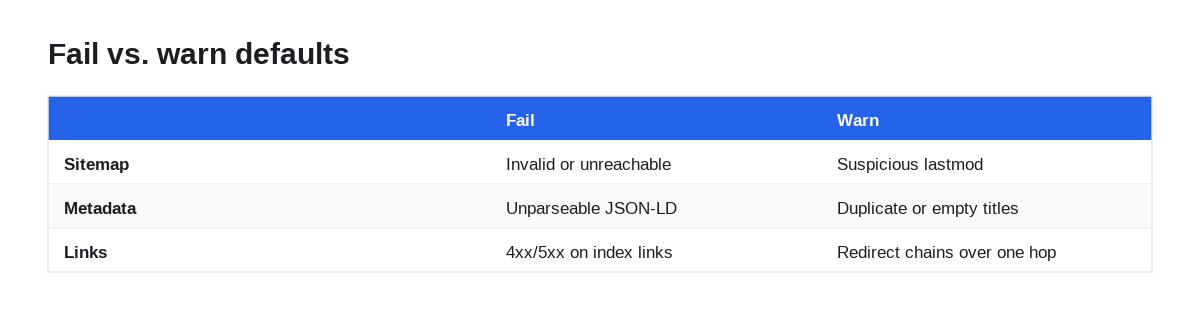
| Check | Automate in CI? | Default severity |
|---|---|---|
| Raw-HTML content | Yes | Fail |
| noindex / robots / status | Yes | Fail |
| Canonical | Yes | Fail |
| Sitemap validity and freshness | Yes | Fail (validity), warn (lastmod) |
| Metadata uniqueness, JSON-LD parse | Yes | Warn / fail on parse error |
| Links and redirect chains | Yes | Fail on 4xx/5xx, warn on chains |
| CMS sync | Yes | Fail after window |
| Index coverage, content quality, rich-result eligibility | Human review | n/a |
How to roll it out
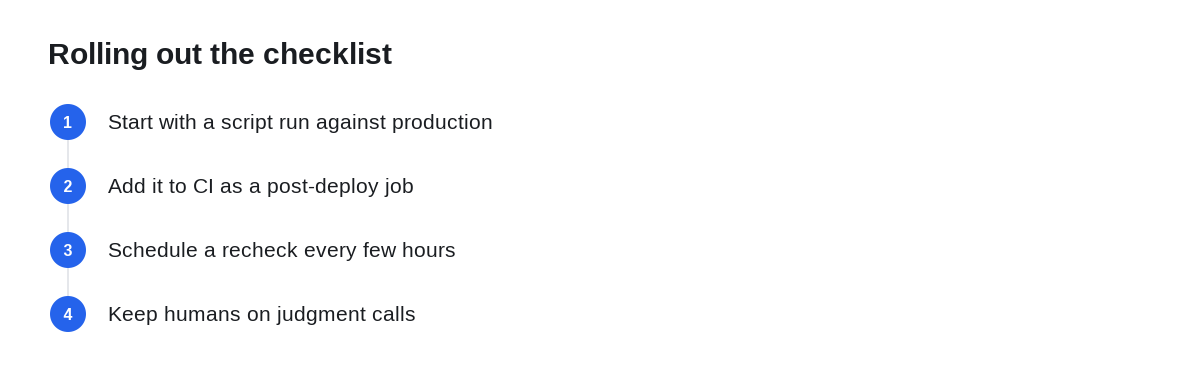
- Start with a script. Run it against the production URL, not localhost, after deploy. Hard-code five to ten representative URLs: the index, newest post, an older post, a 404 probe, the sitemap, and robots.txt. Exit non-zero on any fail.
- Add to CI. Run it as a post-deploy job. If it fails, block promotion where your platform allows, or alert and roll back.
- Schedule a recheck. Run the same script on a timer (every few hours is a reasonable starting point) to catch CMS-side and config drift. Route fails to the on-call channel and warns to a weekly digest.
- Keep humans on judgment calls. Review Search Console's page indexing report, which Google points to for monitoring noindex, plus the URL Inspection tool for the HTML Googlebot received, and content quality.
Prove the checklist works
On a preview environment, break each check on purpose, one at a time: ship an app-shell post, add a noindex header, point a canonical at the preview host, drop the newest post from the sitemap, break a JSON-LD field, unpublish a CMS entry from the build. Run the script each time and confirm the expected check fails. If a deliberate break passes, tighten the assertion. Repeat this after major framework upgrades.
Optional: if you already use PilotScribe's Content API
If your coded site gets its articles through PilotScribe, its MCP documentation says an agent can mint the read-only Content API key, provide framework code and run a post-deploy checklist covering rendering, sitemap and canonical. That is a company claim, and the docs supplied don't detail the exact checks or limits, so treat it as a complement to your own script rather than a replacement. PilotScribe's docs describe the headless Content API as the route for coded sites.
FAQ
When should the checks run? After each production deploy, then on a schedule to catch drift unrelated to deploys.
Do I need a headless browser? Not for the core checks, which work on raw HTML. Add a browser pass if you inject canonicals, robots tags or JSON-LD with JavaScript.
Can noindex go in robots.txt? Not for Google, which doesn't support it there. Use a meta tag or X-Robots-Tag header, and don't block the page in robots.txt.