
Short answer: "automating Ghost publishing" is really three separate decisions, and many sites will only need one or two of them. Layer 1 is scheduling (you wrote it, Ghost releases it later). Layer 2 is delivery (an external system creates the post in Ghost through the Admin API). Layer 3 is content generation (something drafts the article for you). Ghost already handles most technical on-page SEO by itself, so your automation should focus on cadence and quality control — not on re-doing metadata Ghost generates anyway.
Disclosure: this guide is published by PilotScribe, which sells an SEO content tool that can publish to Ghost. The comparison below is written to be useful whether or not you ever use it; the one section about our own product is clearly marked.
What Ghost already does for SEO — so you don't automate it twice
Before you buy or build anything, know what's already covered. According to Ghost's official SEO documentation, a Ghost publication ships with:
- Automatic and custom metadata — every post and page has its own metadata, and if you leave fields blank, Ghost automatically uses the data available on the page as a fallback.
- Social metadata — built-in functionality for Twitter Cards and Open Graph tags for Facebook.
- XML sitemaps — created and updated automatically so search engines can find your content.
- Canonical tags — added across the site to tell search engines which version of a page is the "official" one, which helps prevent duplicate-content problems.
- Structured data — included automatically in all posts and pages.
Ghost also documents a Search Console integration for submitting sitemaps and monitoring indexed pages, search impressions and clicks.
The practical consequence: an automation that pushes a title, body, slug and excerpt into Ghost will usually produce a technically valid, indexable page without you writing any meta tag logic. Your automation's job is to supply good titles, descriptions and tags — not to recreate the plumbing.
What Ghost's built-in SEO does not do
Nothing in Ghost's documented feature set picks your keywords, plans internal links, judges whether a draft is thin, or decides when an ageing post needs a refresh. Those are editorial decisions. Any tool that promises "SEO on autopilot" is really automating those gaps — and that's exactly where your review burden sits.
The three layers, side by side
| Layer | What it automates | What you still supply | Main risk |
|---|---|---|---|
| 1. In-CMS scheduling | Release time of finished drafts | Every word, every image | Cadence stalls when the draft queue empties |
| 2. Admin API / middleware delivery | Creating posts in Ghost from an external source | The content and its metadata | Malformed fields, duplicate posts on retries |
| 3. AI generation + delivery | Research, drafting, metadata, cadence | Approval, brand judgement, facts | Publishing something you haven't read |
Layer 1 — Batching and scheduling, often enough if you already have a writer and a backlog
If you have a writer (even if that writer is you), the cheapest automation is batching. Write three or four posts in one session, set their publish dates a week apart using the publish options in your own Ghost editor, and your blog looks consistent without any integration at all. Check the exact options available to you in Ghost's own documentation and in your install, since publish controls depend on your Ghost version and your staff role.
Ordinary software is usually enough here. If you publish twice a month, have a backlog of ideas and no bottleneck in delivery, Layers 2 and 3 add moving parts without adding output. Don't buy tooling you can't feed.
Use Ghost's staff roles as your approval mechanism
If your worry is "what if something goes out before I've read it", Ghost's permission model already helps. Ghost's staff user documentation lists five roles: Contributors can log in and write posts but cannot publish; Authors can create and publish posts and tags; Editors can invite, manage and edit authors and contributors; Administrators have full permissions; and the Owner is an admin who cannot be deleted and holds billing access.
Two consequences worth designing around:
- A drafting account with Contributor-level permissions can fill the queue without ever pushing anything live, which is a structural version of "draft-first".
- Authors are a content-organisation resource, not just a byline: Ghost documents that, within Ghost Handlebars Themes, author archives are automatically added to the XML sitemap and have their own pagination and RSS feeds — but only for staff users assigned to published posts. So don't let an automation spawn a new staff user per post, or you'll generate archive pages nobody needs.
Ghost's documentation also notes that staff users are considered "trusted" by default, and that if you run the front end and the Ghost admin client on the same domain there are unavoidable permissions-escalation vectors — so in environments where users are untrusted, Ghost-Admin and the site front end should run on separate domains. Worth knowing before you hand accounts to freelancers.
Layer 2 — Programmatic publishing with the Admin API
When posts originate outside Ghost — a Google Docs pipeline, a headless workflow, a SaaS tool — the connection point is Ghost's Admin API, authenticated with an Admin API key.
For endpoint paths, field names, authentication mechanics and any host-imposed request limits, use Ghost's official developer documentation and your host's own documentation as the authority. These details change, and getting them from a blog post — any blog post — is how integrations silently break.
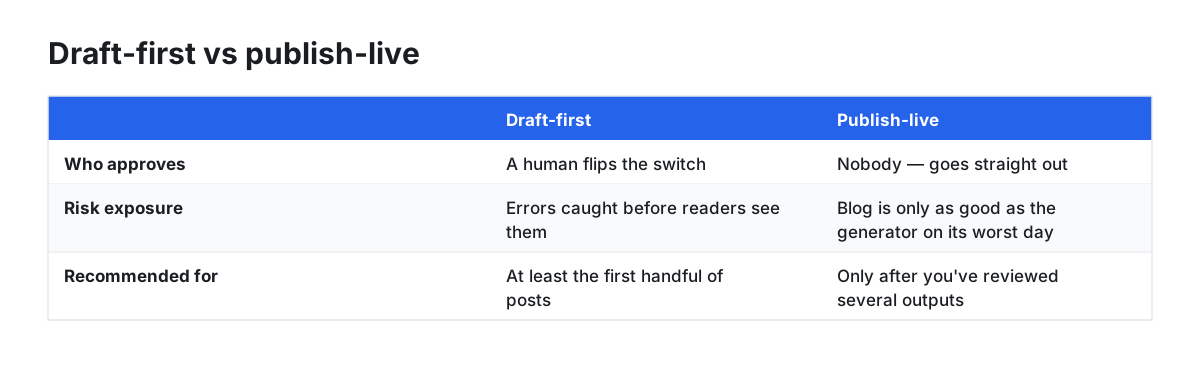
Draft-first vs publish-live is the single most important setting in any Layer 2 setup. Draft-first means the automation creates the post and a human flips the switch. Publish-live means your blog is only as good as the generator on its worst day. Start draft-first for at least the first handful of posts. Note that you usually cannot enforce this with Ghost's roles: per Ghost's Admin API documentation, a custom integration authenticates with a fixed, non-role-based permission set that includes creating posts, so role-based restrictions apply only when authenticating as a staff user (via a staff access token or user login). With an integration key, draft-first depends on the tool's own status setting.
A second practical habit: make your pipeline idempotent. If a call fails and retries, you want it to update the existing post rather than create a near-duplicate with a -2 slug.
Layer 3 — AI generation is a different risk profile
An automation that moves a document you wrote into Ghost can't invent a false claim. A generator can. The review you owe each type of automation is therefore not the same: for Layer 2 you're checking fields; for Layer 3 you're checking facts, angle and originality.
Some tools take on keyword selection, outlining, drafting, metadata and scheduling. What they cannot take on is accountability for what appears under your name — including claims about your own product, pricing, or anything a reader could act on. Keep a human in the loop on those, budget real review time, and don't let a Layer 3 system publish live into an unattended blog in its first weeks.
A short scoped caveat: if you publish in a regulated area — health, finance, legal — automated drafting doesn't change your disclosure and accuracy obligations. Treat generated copy as an unreviewed first draft from a freelancer you've never met, and route it through whatever sign-off you already use.
How to evaluate any Ghost automation tool
Ask these before you connect an Admin API key:
- Does it use the Admin API directly, or route through no-code middleware you'll also have to maintain?
- Can it create drafts, or only publish live?
- Which Ghost fields does it populate — title, slug, excerpt, meta title and description, tags, authors, feature image, canonical?
- What happens on a retry? Does it update the existing post or create a near-duplicate?
- Does it authenticate with an integration key (fixed permissions) or as a staff user, and what does that mean for what it is able to do?
- Can you export your content if you stop paying?
- Does it work with both Ghost Pro and self-hosted installs?
A conditional option: research, drafting and delivery in one system
This is the part where we describe our own product, so weigh it accordingly.
If the bottleneck is that nobody is writing — rather than that publishing is slow — an all-in-one platform is one option rather than the default. PilotScribe states that it can publish straight to your existing CMS, to a turnkey hosted blog, or, for coded sites, through a headless Content API; that Ghost Pro and self-hosted installs are supported via an Admin API key (PilotScribe docs). PilotScribe also states that a review window lets you tweak or approve every post before it goes live (PilotScribe). Those are the company's own descriptions of its product, not independent test results.
If you already have a writer and a queue, Layer 1 plus Ghost's built-in SEO features is the cheaper answer.
Pre-publish QA checklist for automated posts
Run this on every post for the first month, then spot-check:
- Meta title and description present and sensibly truncated (Ghost will fall back to data on the page if they're blank, per Ghost's docs — a fallback is not the same as a deliberate choice).
- Slug is clean and doesn't collide with an existing post.
- Excerpt reads like a human wrote it.
- Tags match your existing taxonomy rather than inventing near-duplicates.
- Author is an existing staff user, not a new one created per post.
- Feature image set, with alt text.
- At least two internal links to relevant existing posts.
- Canonical correct — especially on imported or syndicated content.
- No near-identical post already covering the same query.
How to test an automation before you trust it
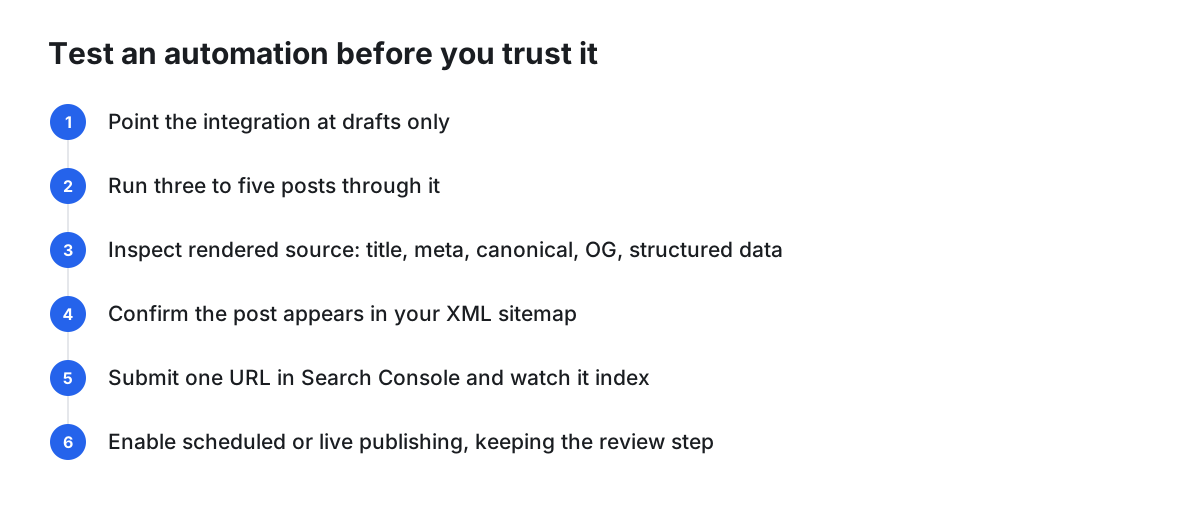
- Point the integration at drafts only, using the tool's own draft setting if it has one.
- Run three to five posts through it.
- Publish one (or preview it) and inspect the rendered source: title tag, meta description, canonical, Open Graph tags, structured data.
- Confirm the post appears in your XML sitemap.
- Submit one URL in Search Console and watch whether it gets indexed.
- Trigger a deliberate retry or re-run on the same article and check you got an update, not a duplicate.
- Only then enable scheduled or live publishing — and keep the review step if your tool offers one.
Illustrative example (hypothetical): a two-person team sets an integration to drop four drafts per month, reviews them on Mondays, and promotes two. If review slips two weeks in a row, that's the signal to lower the cadence rather than raise it.
Monitoring and iteration
Automation makes publishing cheap, which makes pruning important. Ghost's Search Console integration is documented as a way to monitor indexed pages, impressions and clicks (Ghost docs) — use it per URL. Posts sitting just off the first page with real impressions are refresh candidates; posts with near-zero impressions after several months are either mistargeted or redundant, so consolidate them rather than letting thin pages accumulate. Then set a cadence you can actually review at that quality bar. One well-checked post a week beats five you never read.
FAQ
Do I need an SEO plugin for Ghost? Ghost documents automatic and custom metadata, XML sitemaps, canonical tags, structured data and social tags as built-in features (Ghost docs), so the plugin-shaped gap that exists on some other platforms is largely covered. What's missing is strategy: keywords, internal links and content quality.
Can automation break my Ghost SEO? Not usually at the tag level, since Ghost generates the technical markup. It can hurt you through duplicated posts, colliding slugs, off-brand or thin content, stray author archives, and canonical mistakes on imported articles — which is why the QA checklist above focuses there.
Does automated publishing work on self-hosted Ghost as well as Ghost Pro? Ghost's Admin API is available for both Ghost(Pro) and self-hosted installs, so check each tool's own documentation for which it supports. Behaviour that depends on your hosting — request limits, proxies, timeouts — should be checked against your host's documentation rather than assumed.
Should automated posts publish live or as drafts? Drafts first, until you've reviewed several outputs. Ghost's roles can enforce that for people — Ghost's staff documentation notes that Contributors can write posts but cannot publish, while Authors, Editors and Administrators can. For an API-driven tool using an integration key, though, permissions are fixed rather than role-based, so draft-first depends on the tool's own status setting.
Who should the automated posts be attributed to? An existing staff user you're happy to have a public archive for. Within Ghost Handlebars Themes, Ghost generates author archives — with sitemap entries, pagination and RSS — for staff users assigned to published posts (Ghost docs), so attribution is an SEO decision, not just a byline.